-
Interactive DashboardsCreate interactive BI dashboards with dynamic visuals.
-
End-User BI ReportsCreate and deploy enterprise BI reports for use in any vertical.
-
Spreadsheet AnalyticsNewLast-Mile Analytics Tool.
-
Narrative Data StoriesThe Next Evolution of Data Storytelling
-
Automated Business DocumentsNewDocument Generation for Smarter Workflows
-
Visual Data Pipeline BuilderDesign Complex Data Flows, Simply.
-
Wyn ArchitectureA lightweight server offers flexible deployment.
-
 Wyn Enterprise 7.1 is ReleasedThis release emphasizes Wyn document embedding and enhanced analytical express...
 -
 Choosing an Embedded BI Solution for SaaS ProvidersAdding BI features to your applications will improve your products, better serve your customers, and more. But where to start? In this guide, we discuss the many options.
-
Visual GalleryInteractive sample dashboards and reports.
-
BlogExplore Wyn, BI trends, and more.
-
WebinarsDiscover live and on-demand webinars.
-
Customer SuccessVisualize operational efficiency and streamline manufacturing processes.
-
Knowledge BaseGet quick answers with articles and guides.
-
VideosVideo tutorials, trends and best practices.
-
WhitepapersDetailed reports on the latest trends in BI.
-
 Choosing an Embedded BI Solution for SaaS ProvidersAdding BI features to your applications will impr...
 -

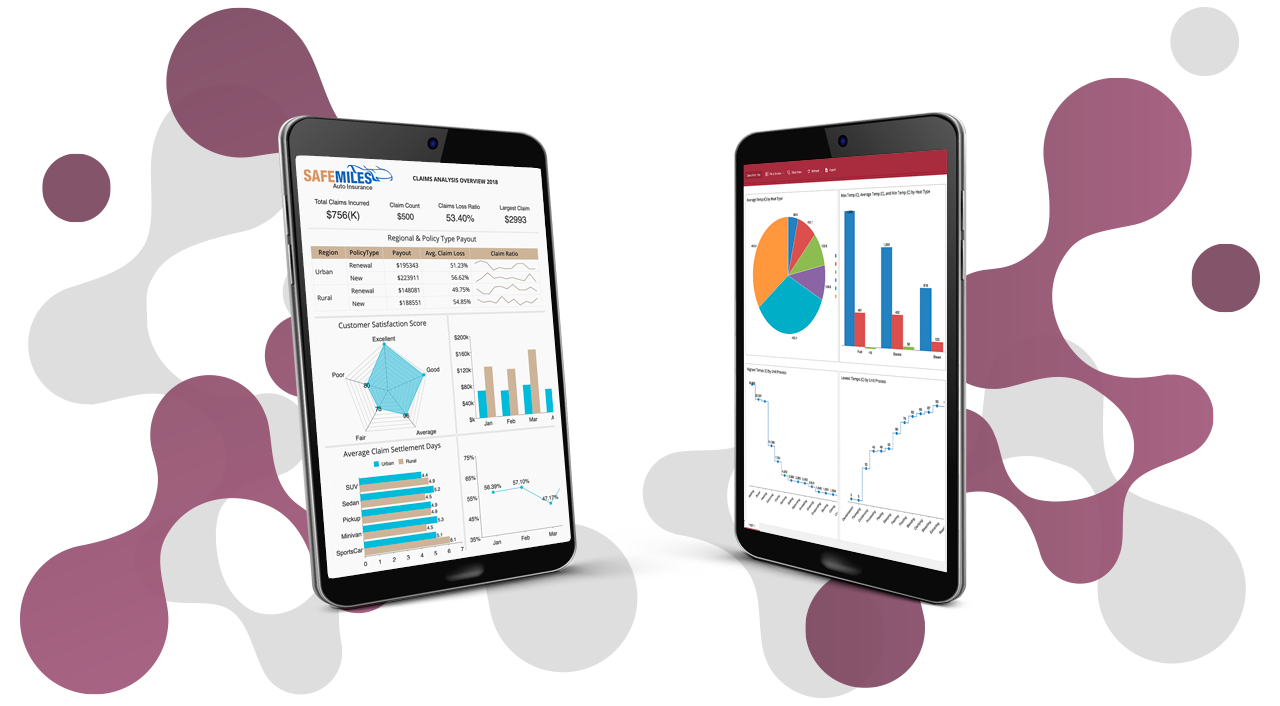
Data visualization plays a significant role in every industry, including finance, healthcare, insurance, manufacturing, retail, and government (to name a few).
With BI dashboards, you can tell a meaningful story. Dashboards graphically represent your data communicating large data sets clearly and efficiently.
Wyn Enterprise is a fully secured enterprise business intelligence software that delivers collaborative self-service reporting and analytics. With Wyn Enterprise, you can build high-value, interactive, and drillable dashboards quickly and easily.
How to create a simple dashboard in less than five minutes.
Wyn Dashboards display information through a series of interactive tiles that contain data visualizers, components, and slicers.
We‘ll start by dragging and dropping a line chart on the design area and binding it to Retail data set which is already available to us.
We’ll use this chart to analyze the revenue generated vs year. Watch how easy it is to create a chart from scratch by just dragging and dropping the data fields and see how the chart title is automatically generated.
Easily Customize Your BI Dashboard
You can easily customize it from the Inspector tab. Set up the line style of the chart, provide a custom title, and set the format and display unit settings.
You can also add a sort condition on the data displayed in the chart. Let’s add a map visualizer, snap and align with the line chart, and plot revenue generated for each country.
Add a Stacked Bar Chart
Next, we’ll add a stacked bar chart to our dashboard to plot revenue versus product line and perform some customizations. We also want to display a revenue summary for each year, so, we’ll add a KPI matrix.
Let’s provide a title to our dashboard using a rich text box and a few customizations. Notice that all of Wyn’s visualizers and components are highly configurable. Before we preview our dashboard, we’ll resize the tiles, apply a theme, and enhance the appearance of the map visualizer.
Preview the result. Observe how the tooltips display information for plots on hovering over the charts. Also, our dashboard is highly interactive. You can drill-down by simply clicking on the individual plots or filter the dashboard data by a single click.
That’s it! With Wyn Enterprise you can easily build an interactive and powerful dashboard in less than five minutes.
Better Data Insights = Better Decisions
Let us show you how Wyn Enterprise can provide greater insights into your data.
Learn how to make data insights more attainable, actionable, and valuable. ↓
FAQ: Creating Business Intelligence Dashboards
1. What is a business intelligence dashboard?
A business intelligence dashboard is a visual tool that consolidates and displays key data metrics in real time. It helps organizations monitor performance, track KPIs, and make informed, data-driven decisions quickly.
2. How can I create a business intelligence dashboard in 5 minutes?
With modern BI tools like Wyn Enterprise, you can select a data source, drag and drop desired fields, choose chart types, and customize your layout enabling you to build a dynamic dashboard in just minutes.
3. What are the main steps to building a BI dashboard?
Building a BI dashboard involves turning raw data into clear, actionable insights. The process is straightforward when broken into key steps that guide you from data connection to sharing with stakeholders.
Main steps to build a BI dashboard:
- Connect to your data source: Link databases, spreadsheets, or cloud applications.
- Select relevant metrics: Focus on KPIs that align with business goals.
- Add visual components: Use charts, graphs, or tables to represent data clearly.
- Arrange the layout: Organize visuals for easy navigation and readability.
- Enable interactivity: Add filters, drill-downs, or tooltips for deeper insights.
- Publish and share: Distribute the dashboard with stakeholders for decision-making.
4. Can I customize my dashboard for different users or departments?
Yes, BI platforms let you tailor dashboards to show different KPIs or data views for executives, managers, or teams ensuring each user gets actionable, relevant insights.
5. What data sources can be connected to a BI dashboard?
Modern BI platforms support a wide range of integrations, allowing organizations to bring all their data into one place for real-time analysis and reporting.
Common data sources for BI dashboards include:
- Databases: SQL Server, Oracle, MySQL, PostgreSQL, and others.
- Spreadsheets: Excel files, CSVs, and Google Sheets.
- Cloud applications: CRM, ERP, HR, and marketing tools like Salesforce, NetSuite, or HubSpot.
- Data warehouses: Snowflake, Amazon Redshift, Google BigQuery, and Azure Synapse.
- APIs and connectors: Pull data from custom applications or third-party systems.
- Live data feeds: Stream IoT, sensor, or operational data in real time.
6. Are BI dashboards interactive and mobile-friendly?
Yes, modern BI dashboards offer interactive filtering, drill-downs, and are responsive for access on desktops, tablets, and mobile devices, supporting decision-making anywhere.
7. What visualizations are commonly used in BI dashboards?
Common elements include bar charts, line graphs, area charts, pie charts, gauges, and tables each designed to highlight trends, comparisons, or distributions in your business data.
8. How do BI dashboards help improve business performance?
Dashboards provide instant visibility into trends, outliers, and performance metrics helping leaders spot opportunities, address issues, and make decisions faster.
9. Can non-technical users create BI dashboards?
Yes, user-friendly, drag-and-drop interfaces mean business users without coding experience can easily build and customize their own dashboards.
10. Why choose Wyn Enterprise for BI dashboards?
Wyn Enterprise delivers fast, customizable, and embedded dashboard creation with unlimited users, real-time analytics, and seamless integration allowing organizations to become truly data-driven.

Ethan Conner
As a Technical Account Manager w ith the Wyn Enterprise team, Ethan loves the collaborative, team-oriented culture. In his spare time, he enjoys playing guitar and drums, learning new technologies, and reading. You can find him on LinkedIn.


Loved by industry
experts and real users