-
Interactive DashboardsCreate interactive BI dashboards with dynamic visuals.
-
End-User BI ReportsCreate and deploy enterprise BI reports for use in any vertical.
-
Narrative Data StoriesThe Next Evolution of Data Storytelling
-
Visual Data Pipeline BuilderDesign Complex Data Flows, Simply.
-
Wyn ArchitectureA lightweight server offers flexible deployment.
-
 Wyn Enterprise 7.1 is ReleasedThis release emphasizes Wyn document embedding and enhanced analytical express...
 -
 Choosing an Embedded BI Solution for SaaS ProvidersAdding BI features to your applications will improve your products, better serve your customers, and more. But where to start? In this guide, we discuss the many options.
-
Visual GalleryInteractive sample dashboards and reports.
-
BlogExplore Wyn, BI trends, and more.
-
WebinarsDiscover live and on-demand webinars.
-
Customer SuccessVisualize operational efficiency and streamline manufacturing processes.
-
Knowledge BaseGet quick answers with articles and guides.
-
VideosVideo tutorials, trends and best practices.
-
WhitepapersDetailed reports on the latest trends in BI.
-
 Choosing an Embedded BI Solution for SaaS ProvidersAdding BI features to your applications will impr...
 -

How to get Debug Level logs
Background:
In this article we will go through how to get debug level logs out of your Wyn server. This is a common practice that will be used to capture errors in a way that gives support and yourself more information around what is happening in the Wyn instance to help in finding solutions to issues that may happen during your use of Wyn.
How to change log level:
Admin portal:
First you will need to go into the admin portal’s System management area. You will need admin level on your user account to do such.
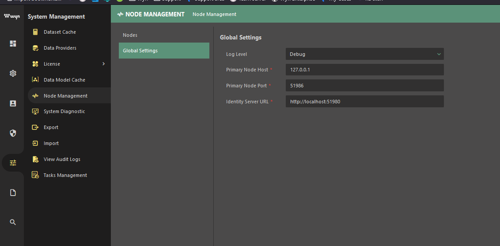
Inside if this you will see the Node management area which has Nodes and Global Settings areas.
You will want to go to Global Settings and then change the log level to Debug* level.
Note: You will want to switch back after you are done recreating the issue you want to capture at Debug level. As it captures more information and thus will eat up more storage.
* You also can set it down to Verbose if even more information is needed, however you typically need only down to Debug unless there is still not enough information.
After this save the changes made, which will cause a short restart of the services at this new log level.
Wyn.conf:
You can also make this change via the wyn.conf file and the log level as seen below.
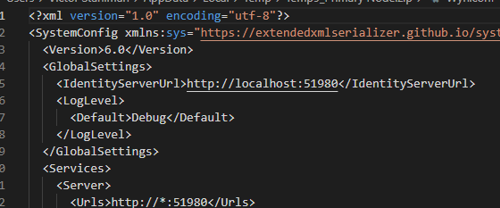
Once the change has been made you will need to restart your Wyn service to initiate the changes in the conf.
Note: Remember to always be careful when editing the Conf file. Please use this method sparingly to avoid unneeded changes.
After changing log level:
Recreate the issue or behavior in question then proceed to next area.
How to get the logs:
File method:
You can get the logs out of the logs directory of the Wyn folder after you recreate the behavior you need to capture.
Admin portal method:
You can go to the System Diagnostics page, and then go to the bottom and select the time range that the error would be included in.
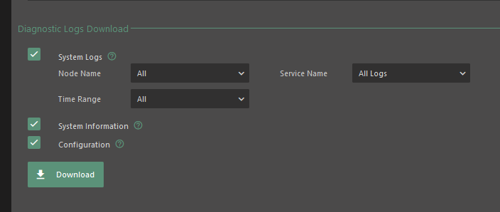
There are also options to include system information and a desensitized configuration file for your Wyn system. As standard practice, please keep these selected if you are working with as support team member as it will help in their process.
Also if on a multi-node system include all nodes involved so we can have the full picture.
After getting the logs:
From there you can set the level back to the level you had previously.
This will avoid using up space on your server if you are not typically at a lower log level such as debug. The best level for you to keep logs at as a standard is info, however you are free to keep the logs at the level your needs fit best.