-
Interactive DashboardsCreate interactive BI dashboards with dynamic visuals.
-
End-User BI ReportsCreate and deploy enterprise BI reports for use in any vertical.
-
Narrative Data StoriesThe Next Evolution of Data Storytelling
-
Visual Data Pipeline BuilderDesign Complex Data Flows, Simply.
-
Wyn ArchitectureA lightweight server offers flexible deployment.
-
 Wyn Enterprise 7.1 is ReleasedThis release emphasizes Wyn document embedding and enhanced analytical express...
 -
 Choosing an Embedded BI Solution for SaaS ProvidersAdding BI features to your applications will improve your products, better serve your customers, and more. But where to start? In this guide, we discuss the many options.
-
Visual GalleryInteractive sample dashboards and reports.
-
BlogExplore Wyn, BI trends, and more.
-
WebinarsDiscover live and on-demand webinars.
-
Customer SuccessVisualize operational efficiency and streamline manufacturing processes.
-
Knowledge BaseGet quick answers with articles and guides.
-
VideosVideo tutorials, trends and best practices.
-
WhitepapersDetailed reports on the latest trends in BI.
-
 Choosing an Embedded BI Solution for SaaS ProvidersAdding BI features to your applications will impr...
 -

A Guide to Dashboard Localization in Wyn Enterprise
A Guide to Dashboard Localization in Wyn Enterprise
In modern analytics platforms, dashboards are no longer consumed by a single audience in a single region. Organizations operate across multiple countries, languages, and regulatory environments, which makes localization a critical aspect of BI design.
Localization in dashboards goes beyond simple translation – it includes adapting date formats, number separators, currencies, and cultural conventions to match the expectations of each user. When done correctly, it improves usability, reduces misinterpretation of data, and enhances overall user adoption.
Without proper localization, the same dashboard can become confusing or even misleading. For example, a value like 1,234 could represent one thousand two hundred thirty-four in the US, but one point two three four in some European contexts. Similarly, date formats like 01/02/2024 can be interpreted differently depending on the region.
This is why modern BI tools must support dynamic, user-specific formatting, ideally driven by user profiles or tenant-level configurations.
A common question we hear is:
How can we configure date and number formats globally so they automatically adjust based on the logged-in user or tenant? Can formatting be tied to user claims like locale (e.g., de-AT or en-US)?
In Wyn Enterprise, you can achieve dynamic, user-specific formatting using User Contexts and Custom Properties.
Let’s walk through a practical approach.
We want dashboards to automatically adapt formatting based on the user:
- European users → d/m/yyyy, €1.234,56
- US users → m/d/yyyy, $1,234.56
Step 1: Define User Contexts in the Admin Portal
Start by configuring User Contexts in the Admin Portal.
Create two contexts:
- Currency
- DateFormat
These act as dynamic variables tied to each user. For more details on this feature, refer to the Wyn User Guide.
Step 2: Add Custom Properties
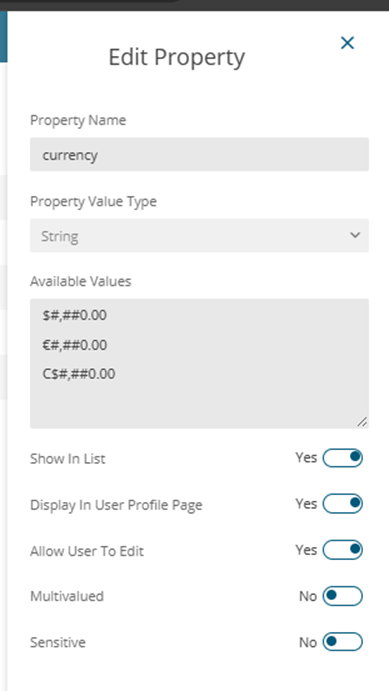
Next, define the possible formatting options in Custom Properties.
Example: Currency formats
Example: Date formats
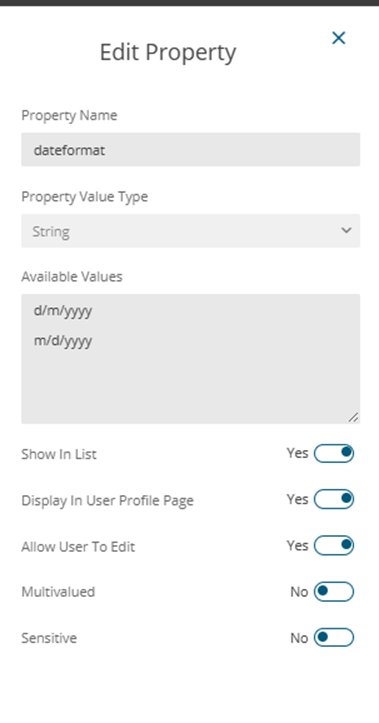
This allows you to standardize formatting patterns across your dashboards.
Step 3: Assign Context Values to Users
Go to the Users menu and assign the appropriate context values.
For example:
- EU users:
- Currency → €#,##0.00
- DateFormat → d/m/yyyy
- US users:
- Currency → $#,##0.00
- DateFormat → m/d/yyyy
At this point, each user carries their own formatting configuration.
Step 4: Create Dashboard Parameters
Now move to the dashboard level and create two parameters:
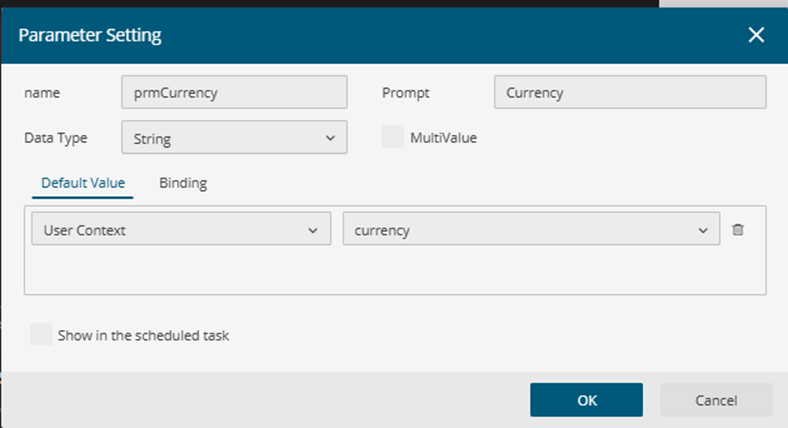
1. Currency Parameter
- Type: String
- Default Value: User Context: Currency
- Optional: Bind to a slicer if users should switch currency manually
2. DateFormat Parameter
- Type: String
- Default Value: User Context: DateFormat
- Binding: None
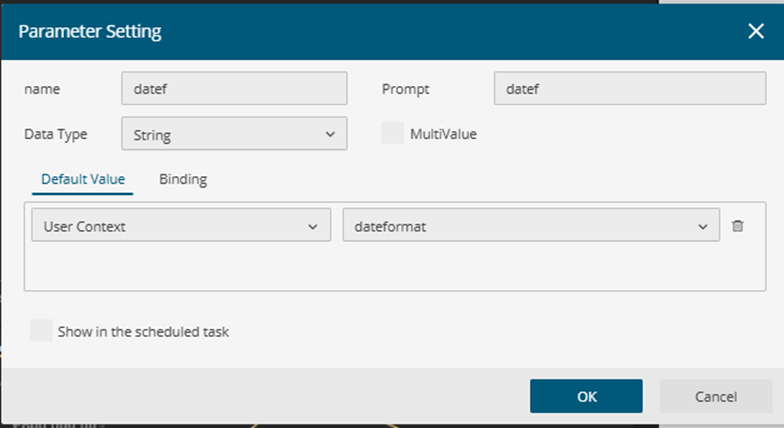
These parameters act as bridges between user settings and visual formatting. Learn more about Dashboard Parameters in this section of the User Guide.
Step 5: Apply Formatting in Visuals
Finally, apply these parameters inside each visual:
- Select a Column Chart
- Open the Inspector panel/Value Axis
- Set Format to Custom
- Use the Currency parameter
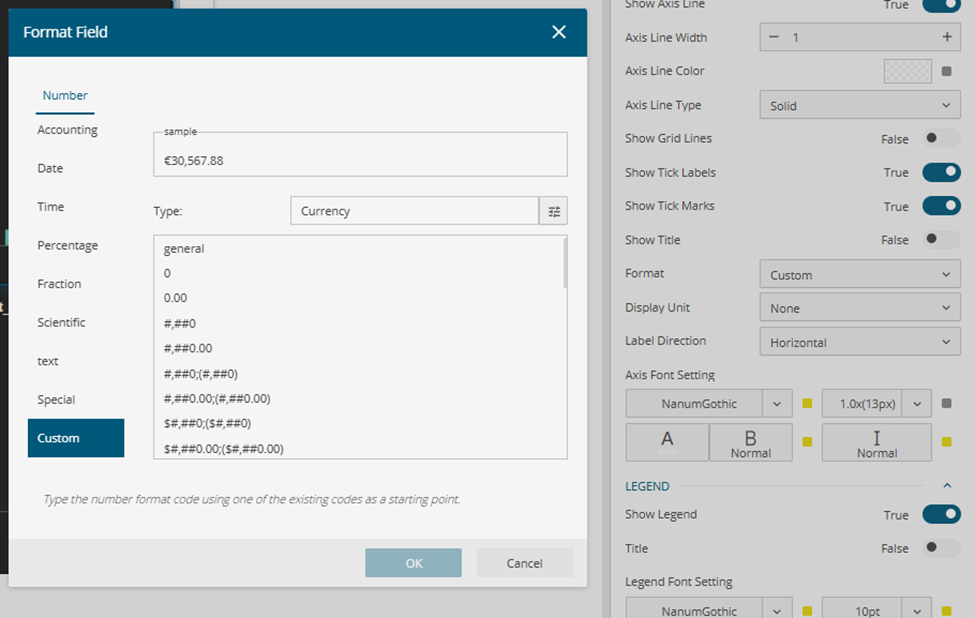
2. Add & Select the Date Range Slicer
- Open the Inspector panel/DataFormat
- Set Format to Custom
- Use the dateformat parameter
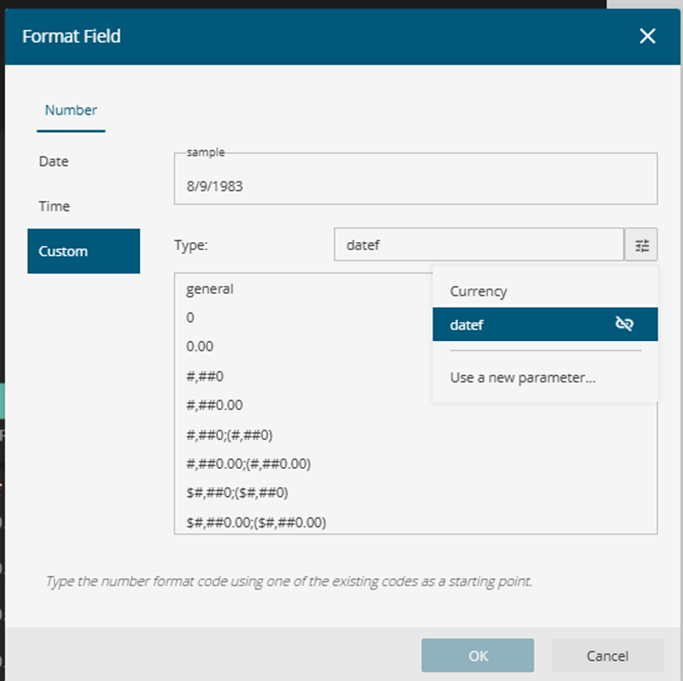
This ensures that formatting dynamically reflects the logged-in user. This ensures that formatting dynamically reflects the logged-in user. To learn how to dynamically switch between different date formats in a chart or table by binding a parameter to a slicer, refer to the User Guide for more details.
Dashboard Preview for Different Logged-In Users:
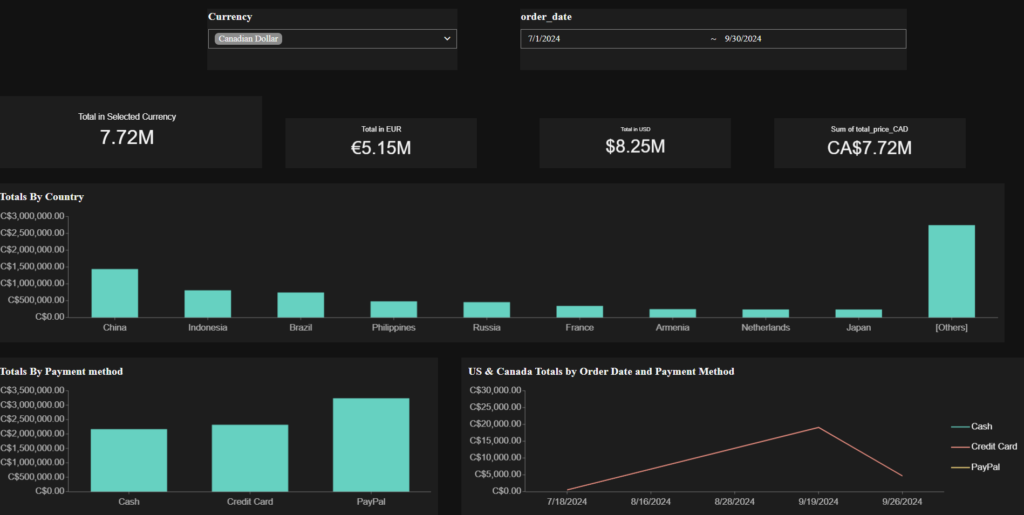
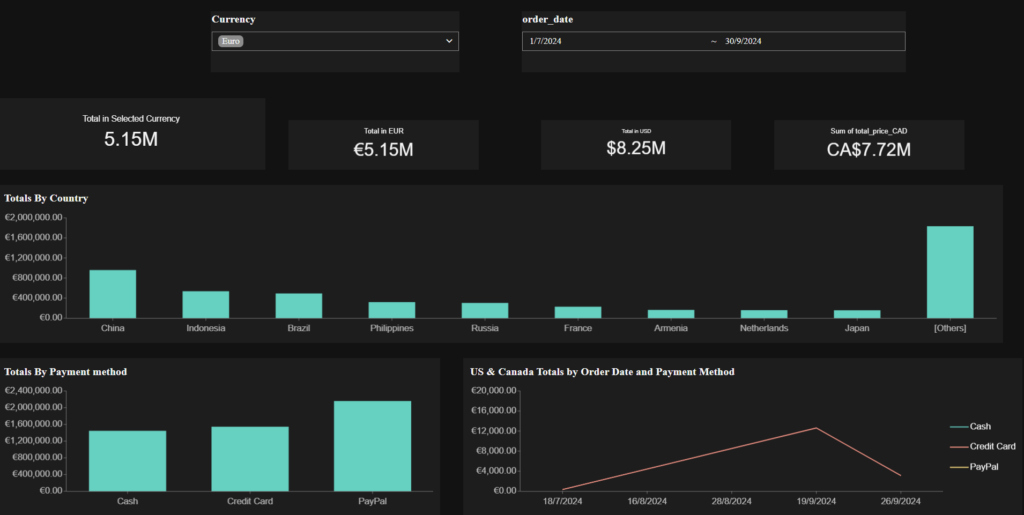
Conclusion
By combining User Contexts, Custom Properties, and Dashboard Parameters, you can create a powerful localization strategy in Wyn Enterprise.
This approach ensures:
- Consistent formatting across dashboards
- Personalized user experiences
- Support for global teams without duplicating reports
As your organization grows internationally, this pattern becomes essential for delivering intuitive and region-aware analytics.

Enea Gega
Enea is a Technical Product Enablement Specialist for the Wyn Enterprise Platform. He acts as a vital bridge between customers, product teams, and engineering to ensure that every new feature delivers genuine value and drives user adoption.
Enea specializes in translating complex customer needs into actionable insights for product roadmaps and technical documentation. By partnering cross-functionally, he ensures seamless delivery readiness and alignment across all releases.