-
Interactive DashboardsCreate interactive BI dashboards with dynamic visuals.
-
End-User BI ReportsCreate and deploy enterprise BI reports for use in any vertical.
-
Spreadsheet AnalyticsNewLast-Mile Analytics Tool.
-
Narrative Data StoriesThe Next Evolution of Data Storytelling
-
Automated Business DocumentsNewDocument Generation for Smarter Workflows
-
Visual Data Pipeline BuilderDesign Complex Data Flows, Simply.
-
Wyn ArchitectureA lightweight server offers flexible deployment.
-
 Wyn Enterprise 7.1 is ReleasedThis release emphasizes Wyn document embedding and enhanced analytical express...
 -
 Choosing an Embedded BI Solution for SaaS ProvidersAdding BI features to your applications will improve your products, better serve your customers, and more. But where to start? In this guide, we discuss the many options.
-
Visual GalleryInteractive sample dashboards and reports.
-
BlogExplore Wyn, BI trends, and more.
-
WebinarsDiscover live and on-demand webinars.
-
Customer SuccessVisualize operational efficiency and streamline manufacturing processes.
-
Knowledge BaseGet quick answers with articles and guides.
-
VideosVideo tutorials, trends and best practices.
-
WhitepapersDetailed reports on the latest trends in BI.
-
 Choosing an Embedded BI Solution for SaaS ProvidersAdding BI features to your applications will impr...
 -

How to Create a Scheduled Task in Wyn Enterprise Using the API
Background:
A scheduled task in Wyn allows users to execute a manual, one-time, or recurring operation on a document.
As part of our ongoing efforts to make Wyn easier and more flexible to use, we have introduced a new API endpoint. This endpoint enables administrative users to create and manage scheduled tasks programmatically.
With this API, you can create tasks that:
- Export reports or dashboards to various formats (PDF, Excel, etc.)
- Deliver results via email (as attachment, link, or embedded body)
- Save output to local storage
- Send output to external storage (FTP, SFTP, AWS S3, Azure Blob, etc.)
- Export to file shares (SMB)
- Refresh datasets or data models on a schedule
- Run as one-time, recurring (cron-based), or manually triggered tasks
The newly introduced API Endpoint is /api/v2/scheduler/tasks
Request Details:
| Property | Value |
|---|---|
| Route | {server}/api/v2/scheduler/tasks |
| Method | POST |
| Content-Type | application/json |
Authentication:
All API requests require a valid access token.
Pass the token as a query parameter
?token=YOUR_ACCESS_TOKENor in the request header
Reference-Token = YOUR_ACCESS_TOKENRequest Parameters:
None
Request Body Reference
Top-Level Properties
| Property | Type | Required | Description |
|---|---|---|---|
templateId | string | Optional | Configuration template ID. Leave as empty string "" for manual configuration. |
description | string | Required | The task title/description. |
isActive | boolean | Optional | Whether the task is enabled. Default: true. |
documentId | string | Required | The ID of the report or dashboard to schedule. |
task | TaskInfo | Required* | Single task information. Required when compoundTask is false. |
tasks | TaskInfoArray | Optional | Multiple sub-tasks for compound tasks. |
trigger | Trigger | Required | When/how the task should be triggered (one-time, recurring, or explicit). |
deployTo | DeployTarget | Optional | Where the output is delivered (email, local storage, external storage, etc.). |
historyDataExpiryDuration | string | Optional | History data expiry setting. Use "0:never_expire" to keep forever. |
compoundTask | boolean | Optional | Set to true if this task contains multiple sub-tasks. Default: false. |
runAs | RunAs | Optional | Execute the task as a specific user. |
failInformEmail | string | Optional | Email address to notify on task failure. |
failInformProvider | FailInformProvider | Optional | Advanced failure notification provider configuration. |
operationType | string | Optional | Operation type for the task (e.g., "Append"). |
location | string | Optional | Operation location path. |
dataUpdateMode | string | Optional | Enum: Override | IncrementalUpdate |
In this knowledge base, we use an example that schedules a task to run every weekday at 08:00 Eastern Time.
Requirements:
- Task Type: Report Export
- Distribution Channel (deploy to): Email
- Occurrence: Every weekday at 08:00 Eastern Time
- Receivers: Multiple
- Export Templates: No
cURL Example.
curl --location 'http://localhost:51980/api/v2/scheduler/tasks' \
--header 'Reference-Token: YOUR_ACCESS_TOKEN' \
--header 'Content-Type: application/json' \
--data-raw '{
   "templateId": "",
  "description": "Cash Flow Report Task",
  "historyDataExpiryDuration": "0:never_expire",
  "isActive": true,
  "task": {
    "taskType": "RptExport",
    "payload": "{\"isEmailBody\":false,\"parameters\":{},\"bursting\":null,\"settings\":{},\"exportFormat\":\"pdf\"}",
    "parameters": "{}",
    "documentId": "b1d3027c-f808-4a0b-b8d8-b398cc18631a"
  },
  "documentId": "b1d3027c-f808-4a0b-b8d8-b398cc18631a",
  "trigger": {
    "pattern": {
     "patterns": ["0 0 8 ? * MON,TUE,WED,THU,FRI *"],
     "startDate": "2026-04-04T05:00:00.627Z",
     "endDate": null,
     "timeZoneId": "Eastern Standard Time"}
  },
  "deployTo": {
    "emailAttach": {
      "settings": {
        "mailTo": ["enea.gega@wynenterprise.com", "experts@wynenterprise.com"],
        "subject": "Cash Flow Report",
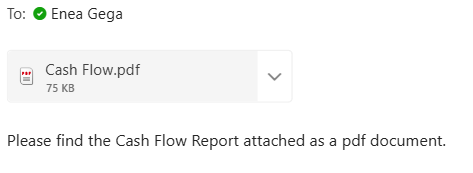
        "body": "Please find the Cash Flow Report attached as a pdf document.",
        "bodyForEmptyDocument": "",
        "replyTo": "enea.gega@wynenterprise.com",
        "useRichText": false,
        "allowUserChangeEmailTo": false
      },
      "localStore": {
        "allowAnonymous": false,
        "storePolicy": {
          "forever": true
        }
      }
    }
  },
  "compoundTask": false
}'
This is an example of a successful (200) response:
curl --location 'http://localhost:51980/api/v2/scheduler/tasks' \
--header 'Reference-Token: YOUR_ACCESS_TOKEN' \
--header 'Content-Type: application/json' \
--data-raw '{
   "templateId": "",
  "description": "Cash Flow Report Task",
  "historyDataExpiryDuration": "0:never_expire",
  "isActive": true,
  "task": {
    "taskType": "RptExport",
    "payload": "{\"isEmailBody\":false,\"parameters\":{},\"bursting\":null,\"settings\":{},\"exportFormat\":\"pdf\"}",
    "parameters": "{}",
    "documentId": "b1d3027c-f808-4a0b-b8d8-b398cc18631a"
  },
  "documentId": "b1d3027c-f808-4a0b-b8d8-b398cc18631a",
  "trigger": {
    "pattern": {
     "patterns": ["0 0 8 ? * MON,TUE,WED,THU,FRI *"],
     "startDate": "2026-04-04T05:00:00.627Z",
     "endDate": null,
     "timeZoneId": "Eastern Standard Time"}
  },
  "deployTo": {
    "emailAttach": {
      "settings": {
        "mailTo": ["enea.gega@wynenterprise.com", "experts@wynenterprise.com"],
        "subject": "Cash Flow Report",
        "body": "Please find the Cash Flow Report attached as a pdf document.",
        "bodyForEmptyDocument": "",
        "replyTo": "enea.gega@wynenterprise.com",
        "useRichText": false,
        "allowUserChangeEmailTo": false
      },
      "localStore": {
        "allowAnonymous": false,
        "storePolicy": {
          "forever": true
        }
      }
    }
  },
  "compoundTask": false
}'
As shown in the screenshot below, the exporting task has been created and is scheduled to run every weekday at 08:00 Eastern Time. The Scheduled Task panel on the right displays the next run time as 6 April 2026 at 15:00. This reflects the time difference between my local time zone and Eastern Time
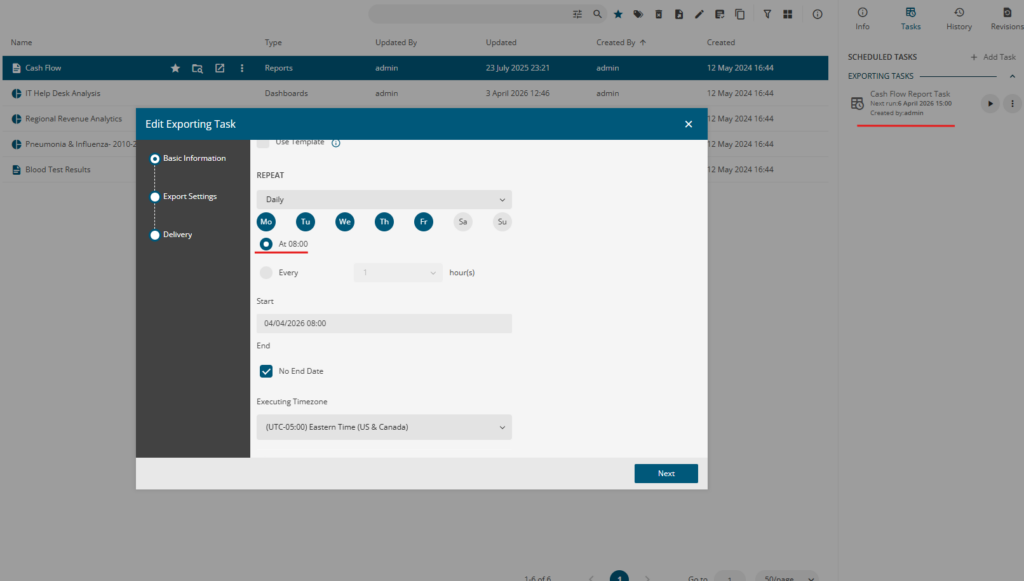
As shown in the screenshot below, the exporting task has been created and is scheduled to run every weekday at 08:00 Eastern Time. The Scheduled Task panel on the right displays the next run time as 6 April 2026 at 15:00. This reflects the time difference between my local time zone and Eastern Time
Here is the full list of object types that can be used in the request body:
TaskInfo Object
| Property | Type | Required | Description |
|---|---|---|---|
taskType | string | Required | Enum: RptExport | DashExport | DatasetRefresh | DataSourceExtract | DatasetCleanup | DataModelRefresh | CompoundTask | RptPreviewCache | DataflowRefresh | RptServerPrint |
payload | string | Required | JSON string containing task-specific settings (e.g., export format, PDF settings). This is the export configuration captured from the UI. |
parameters | string | Optional | JSON string of report parameters. Use "{}" for no parameters. |
documentId | string | Required | The document ID for this specific task step. |
userDetails | UserDetails | Optional | User details associated with this task. |
TaskInfoArray Object
| Property | Type | Required | Description |
|---|---|---|---|
taskInfos | TaskInfo[] | Required | Array of TaskInfo objects for compound tasks. |
userDetails | UserDetails | Optional | Shared user details across all sub-tasks. |
UserDetails Object
| Property | Type | Description |
|---|---|---|
id | string | The unique identifier of the user. |
name | string | The display name of the user. |
provider | string | The authentication provider (e.g., "local"). |
tenantId | string | The tenant identifier. |
createdByIntegration | boolean | Whether the user was created by an integration. |
RunAs Object
| Property | Type | Description |
|---|---|---|
userId | string | The user ID to run the task as. |
username | string | The username of the run-as user. |
organizationId | string | The organization ID. |
provider | string | The authentication provider. |
FailInformProvider Object
| Property | Type | Description |
|---|---|---|
emailProvider | object | Email failure notification. Contains: mailTo (string[]) – recipient email addresses. |
appMsgProvider | object | In-app message failure notification. Contains: recipients (string[]) – user IDs to notify. |
Trigger Configuration Reference
The trigger object determines when and how the task is executed. Set exactly one of the following fields:
| Trigger Type | Field | Description |
|---|---|---|
| Explicit (Manual) | "explicit": true | The task will only run when manually triggered (e.g., via Run Task API or UI). |
| One-Time | "once": "datetime" | The task runs once at the specified UTC datetime. Use onceTimeZoneId for time zone. |
| Recurring (Cron) | "pattern": {...} | The task runs on a recurring schedule defined by cron expressions. |
| Template | "templateId": "id" | The task uses a schedule template. |
Pattern (Recurring) Object
| Property | Type | Description |
|---|---|---|
patterns | string[] | Array of Quartz cron expressions. |
startDate | datetime | The earliest date the schedule can start (UTC). |
endDate | datetime | The latest date the schedule can run (UTC). Null for no end date. |
timeZoneId | string | IANA or Windows time zone ID (e.g., "America/New_York" or "Eastern Standard Time"). |
Important: The time zone ID must match the server’s operating system. Windows servers use Windows time zone IDs (e.g.,
"Central European Standard Time"), not IANA IDs (e.g.,"Europe/Berlin"). You can retrieve the list of supported time zones by runningwindow.ServerTimeZones.map(a => a.id)in the browser console.
Delivery Target (deployTo) Reference
The deployTo object specifies where the task output is delivered. Set exactly one of the following fields:
| Delivery Type | Field | Description |
|---|---|---|
| Local Storage | localStore | Store results in Wyn’s built-in storage. |
| Email (Attachment) | emailAttach | Send the exported file as an email attachment. |
| Email (Embedded Body) | emailBody | Embed the report content in the email body. |
| Email (Link) | emailLink | Send an email with a link to the report. |
| Email (Download Link) | emailDownloadLink | Send an email with a download link for the exported file. |
| File Share (SMB) | smb | Save to a network file share via SMB/UNC path. |
| External Storage | externalStorage | Save to FTP, SFTP, AWS S3, Azure Blob, or SharePoint. |
| App Notification (Online Link) | appOnlineLinkNotification | Send an in-app notification with an online link. |
| App Notification (Download Link) | appDownloadLinkNotification | Send an in-app notification with a download link. |
| Server Printer | serverPrinter | Send the report to a server-side printer. |

Enea Gega
Enea is a Technical Product Enablement Specialist for the Wyn Enterprise Platform. He acts as a vital bridge between customers, product teams, and engineering to ensure that every new feature delivers genuine value and drives user adoption.
Enea specializes in translating complex customer needs into actionable insights for product roadmaps and technical documentation. By partnering cross-functionally, he ensures seamless delivery readiness and alignment across all releases.